How AI-Powered Prototyping Cuts Dashboard Requirements Iteration from Weeks to Hours

Picture this: You spend a week building a custom dashboard component. The mockup looks perfect in Figma. Your code is clean. You present it to the client, and within thirty seconds, they're asking for changes that would require starting over.
This scenario played out repeatedly in our life sciences work at Appsilon. We'd invest significant development time creating polished prototypes, only to discover that our interpretation of "interactive doctor profiles" didn't match the client's vision of "FIFA-style player cards with flip animations."
The bottleneck was the dashboard requirements iteration cycle. Clients couldn't visualize complex interactions from static mockups, and every iteration required pulling developers and designers away from other projects. We couldn't afford to build every concept to full fidelity just to test an idea.
That's when we started experimenting with AI-powered rapid prototyping using tools like v0.dev. The results surprised us: what used to take a week of careful development work could now be prototyped in hours, complete with interactions and realistic data.
The most expensive mistakes in consulting happen when you build the wrong thing efficiently. Traditional dashboard requirements iteration can take weeks - but AI-powered prototyping changes everything. Explore our Shiny Dashboard demo gallery to see how LLMs allow you to build apps faster than ever.
The Hidden Cost of Traditional Dashboard Requirements Iteration
In traditional dashboard development, the discovery phase follows a predictable but expensive pattern:
- Client describes their vision
- We translate it into technical requirements
- Designers create static mockups
- Developers build interactive prototypes
Only then - often 5 man-days later - do we discover whether our interpretation matches their expectations.
This process works fine for standard components like tables or charts. But for creative, custom dashboard interactions, it's wasteful. The more innovative the component, the higher the risk of misalignment between client expectations and our initial implementation.
The problem isn't the engineering work itself - once we know what we're building, our developers are efficient. The bottleneck is in the messy, exploratory phase where we're still figuring out what the client actually wants. This is where we started experimenting with AI-powered rapid prototyping, not to replace engineering work, but to accelerate the "what are we actually building?" conversation.
How AI-Powered Dashboard Requirements Discovery Works
Our solution emerged from a simple observation: most requirement misalignments happen because clients can't visualize complex interactions from descriptions or static mockups.
They need to see and interact with the component to understand what they actually want.
We developed a three-step workflow for rapid dashboard requirements discovery:
Step 1: Crystallize dashboard requirements with conversational AI
Instead of jumping straight into design, we start with ChatGPT or Claude to explore the functional requirements.
- What should the component do?
- How should users interact with it?
- What data does it need to display?
This conversation helps us understand the core concept before any visual work begins.
Step 2: Generate a detailed v0.dev prompt for dashboard prototyping
Once we understand the requirements, we ask the AI to create a comprehensive prompt for v0.dev. This prompt includes not just the visual design, but the interactions, data structure, and user experience flows.
Step 3: Iterate rapidly in v0.dev for dashboard prototypes
We take the prompt to v0.dev and iterate on the visual prototype. Within hours, we have a working, interactive component that clients can click through and experience directly.
This workflow happens before our engineering process - it doesn't replace it. We're essentially moving the "figure out what we're building" conversation earlier and making it visual and interactive.
Case Study: FIFA-Style Doctor Dashboard Cards
A recent pharma project illustrates this AI-powered dashboard requirements approach perfectly.
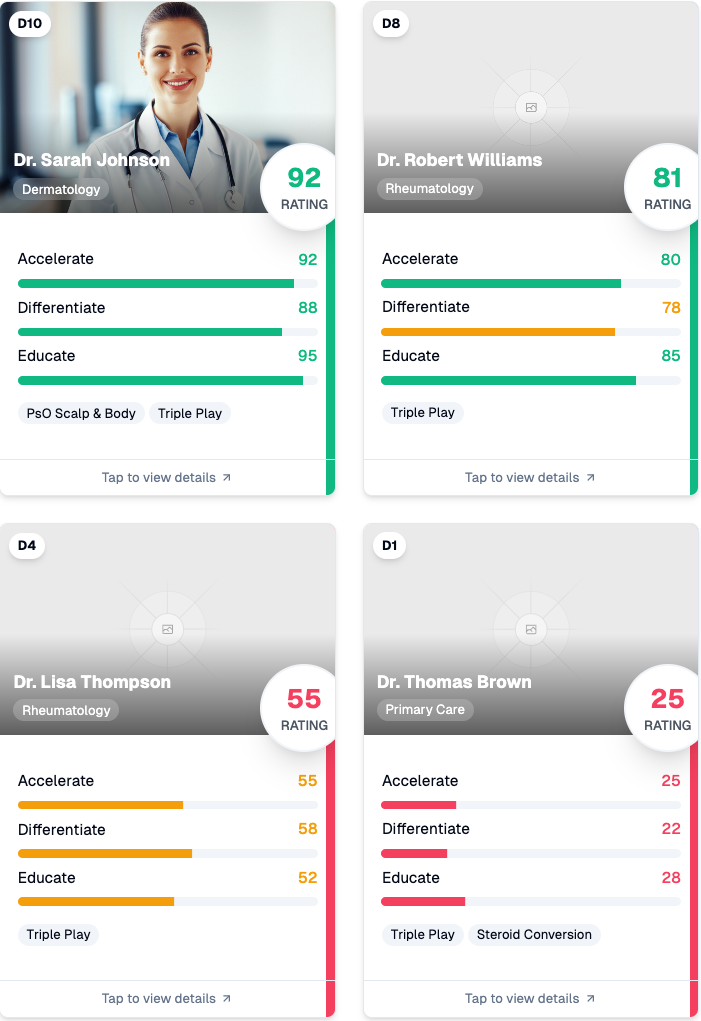
A client wanted a dashboard for browsing medical specialists, but their vision went beyond standard list views. They wanted each doctor represented as an interactive card with performance metrics, similar to FIFA player cards.
The traditional dashboard development approach would have meant:
- Designer creates static mockups
- Developer builds interactive prototype
- Client reviews and requests changes
- Repeat until alignment is achieved
- Total time: 5 man-days
Instead, we used our AI-powered discovery workflow.
Clarifying dashboard requirements
We spent time with Claude exploring what "FIFA-style doctor cards" actually meant.
- What metrics should be displayed?
- How should the interaction work?
- What happens when users click on a card?
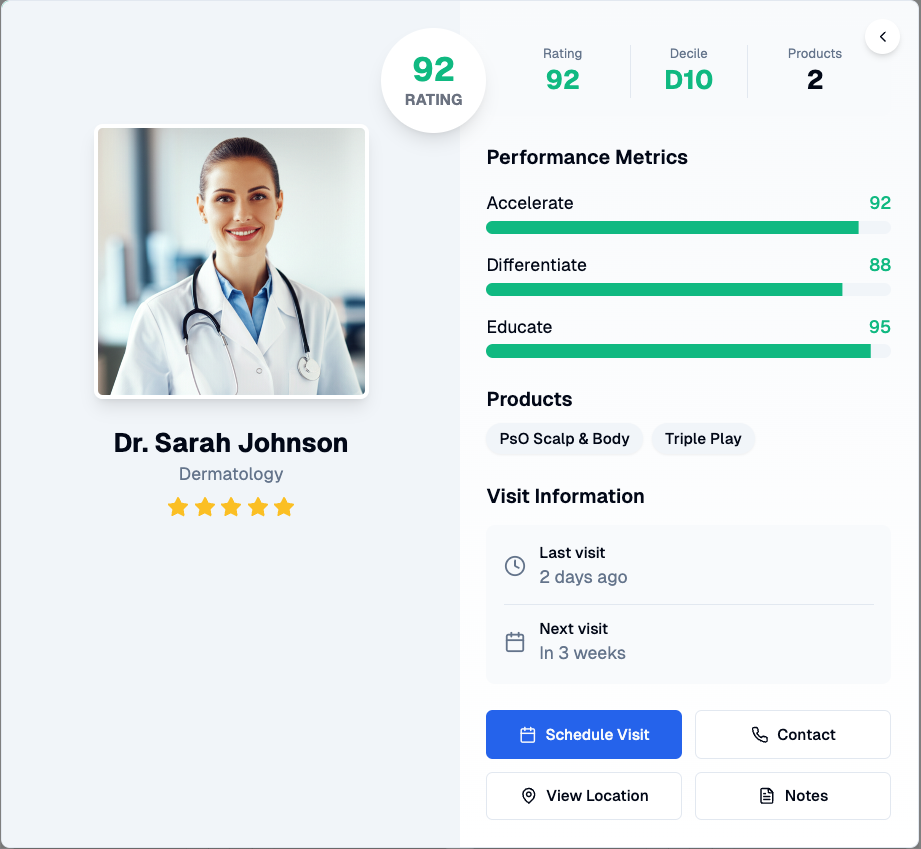
This conversation helped us understand that the client wanted a flip animation revealing detailed information - not just a hover effect or modal.
Generating the dashboard prototype
Armed with clear requirements, we created a v0.dev prompt that specified the card design, flip animation, performance metrics display, and interaction patterns. Within hours, we had a working prototype showing Dr. Sarah Johnson's card with her specialization, performance ratings, and detailed flip view including visit information and action buttons.
Client validation for dashboard components
The client was impressed with both the concept and execution. More importantly, they could directly interact with the component, and understand immediately how users would navigate through doctor profiles.
This immediate, tangible progress kept them engaged and excited about the project direction, and made it easier to secure buy-in for the full implementation.
The result: half a day of discovery work instead of a full week - a 90% time reduction from 5 man-days to 0.5 man-days.
The AI-generated prototype wasn't production-ready code, but it was sophisticated enough to validate the concept and gather detailed feedback. Our designers could then fine-tune the visual details while developers built the production version with full confidence in the requirements.
The Real Impact: Better Dashboard Requirements, Not Faster Code
This approach has fundamentally changed how we think about project discovery phases for dashboard development. We're using AI to have better conversations about requirements and turn abstract client visions into concrete, interactive prototypes.
The time savings are significant, but the real value is in the quality of alignment we achieve before any serious development begins. The sweet spot is creative, custom dashboard components where clients struggle to articulate their vision. Standard tables, charts, and forms don't need this treatment. But when a client says they want "something innovative" or "more engaging than a typical dashboard," rapid AI prototyping helps us understand what they actually mean.
This workflow has also shifted our project timelines. Instead of front-loading development risk in the discovery phase, we can explore multiple dashboard concepts quickly and make informed decisions about where to invest our engineering time. Clients immediately see tangible progress, and we avoid the expensive cycle of build-review-rebuild that plagued our custom component projects.
FAQ: AI-Powered Dashboard Requirements Iteration
How accurate are AI-generated dashboard prototypes compared to final products?
AI prototypes capture 80-90% of the user experience and interactions. They're sophisticated enough for client validation but require developer refinement for production use.
What types of dashboard projects benefit most from AI-powered requirements iteration?
Custom, creative dashboard components work best. Standard tables, charts, and forms don't need this treatment. Focus on innovative interactions where clients struggle to articulate their vision.
How much time does AI-powered dashboard prototyping actually save?
We've seen 90% time reduction in requirements discovery - from 5 man-days to 0.5 man-days for complex custom components. The savings compound when you avoid building the wrong thing.
Can non-technical team members use this AI dashboard prototyping workflow?
Yes, the conversational AI step helps translate business requirements into technical specs. However, someone with basic design understanding should handle the v0.dev iteration phase.
What tools do you need for AI-powered dashboard requirements iteration?
We use ChatGPT or Claude for requirement clarification, v0.dev for visual prototyping, and standard design tools for final refinement. Total cost is minimal compared to traditional prototyping approaches.
Transform Your Dashboard Development Process with AI
The broader lesson extends beyond dashboard development.
In consulting, the most expensive mistakes happen when we build the wrong thing efficiently. AI-powered rapid prototyping helps us build the right dashboard by making the "what are we building?" conversation visual, interactive, and fast.
Ready to accelerate your dashboard requirements process? Book a call with our expert consultants and move your next project from concept to deployment.