Building a Clinical Dashboard Prototype in 2 Days: An AI-Assisted Development Workflow

What if you could go from concept to working clinical dashboard prototype in 48 hours instead of 4-6 weeks?
Your team needs a PK/PD simulation dashboard for an upcoming stakeholder meeting, but your developers just don’t have any time to spare. You've got a week to show something functional - multi-dose simulations, concentration-time curves, you get the picture. The traditional route means pulling resources from critical projects, writing specs, and hoping you get something presentable in time.
But what when you don’t have time to spend?
Our development team set out to test whether AI tools could accelerate dashboard development without sacrificing functionality or user experience. The constraint: 2 days, limited initial requirements, and a goal of building a functional demo - not production code.
In this article, we’ll break down a real 2-day sprint where our team built a functional PK/PD simulation platform using orchestrated AI tools - Claude Code, V0.dev, and others working in parallel.
The Challenge: 48 Hours to Build a Clinical Dashboard
If you’re in pharma, you know that doing anything meaningful in two days sounds impossible, let alone building a functional dashboard.
Our team had two example dashboards from past projects (one video walkthrough, one mockup) and some early client notes. As mentioned earlier, the goal wasn't production-quality code. We needed to show what's possible - a working PK/PD simulation platform that could demonstrate multi-dose simulations, concentration-time visualizations, target analysis, and exposure distribution across patient populations.
This meant building something clients could actually interact with during pre-sales conversations.
The only constraint was 48 hours to go from concept to demo. No time for traditional development cycles. No room for extended planning sessions, excessive meetings, or obsessing over details.
We wanted to find out if AI tools can actually accelerate this process without producing code that wastes more time than it saves.
So we leaned heavily into AI-assisted development - but not the way most teams do it.
The AI Dashboard Development Stack - What Worked and What Didn't
We ran six AI tools in parallel. Here's the full stack:
- Google AI Studio - generated initial UI concepts from screenshots and descriptions
- Claude Code (via VSCode IDE) - main driver for Shiny app generation and refinement
- Positron Assistant (via Positron IDE) - backup for R code generation, used interchangeably with Claude
- V0.dev - UI redesign and modern styling suggestions
- ChatGPT - While Claude was doing heavy lifting, we occasionally used ChatGPT for more “creative” tasks, such as generating SVG placeholder images for content not yet generated.
- MCP tools (accessed by Claude Code and Positron Assistant)
- - especially Playwright MCP for testing and screenshots, plus
{btw}and {mcptools} for interacting with R sessions
The main takeaway here was that none of the tools could do everything well individually. We had to combine their strengths to come up with a working app in 48 hours.
The Core Tools: Claude Code and V0.dev for Shiny Development
Claude Code became our go-to tool for the actual Shiny application development.
It handled generating functional R code, implementing the simulation logic, and iteratively refining the app. But combined with Playwright MCP, it could run the app, analyze the app HTML structure, take screenshots, and self-correct based on what it saw.
This feedback loop was critical. Claude would generate code, run it, spot visual or functional issues, and fix them without human intervention.
V0.dev handled the design side. We'd feed it screenshots of our rough Shiny app, and it would generate clean, modern redesigns. Then we'd take V0's output - the visual mockup plus a summary of CSS and layout changes - and feed that back into Claude Code to restyle the Shiny app.
In short, V0 made it look good. Claude made it work.
Tool Performance and Stability Considerations
Not everything ran smoothly.
Google AI Studio generated the best-looking interfaces right out of the gate, but it implemented everything in React with minimal backend logic. Great for visual prototypes, less useful when you need functional PK/PD simulations. We also learned the hard way that it doesn't auto-save.
Positron Assistant (working with Claude Sonnet model) worked well as a backup code generator. We used it interchangeably with Claude Code when we needed alternative approaches to the same problem.
The MCP tools - especially Playwright for automated testing and {mcptools}` for R documentation - turned out to be gems. They added self-correcting functionality to Claude, which cut down on back-and-forth debugging time.
But our real discovery was learning that you can’t do everything with one tool. You need a strategy.
AI-Assisted Development Strategy - Why Multiple Tools Beat Single Solutions
None of the AI tools could do everything well individually. We had to combine their strengths to come up with a working app in 48 hours.
When it comes to AI, we see that most teams pick one assistant and stick with it. That's leaving performance on the table. You probably know that Claude is generally better at writing, and ChatGPT is an overall better assistant. It’s the same in software engineering - you just have more tools at your disposal.
Our approach was to generate multiple versions in parallel, compare them, and merge the best parts.
Parallel Generation and Comparison
As mentioned earlier, we started with anonymized mockups from previous projects as a reference and with minimal client info. The prompt itself contained a demo and a brief information on how we tend to use the application. We provided no additional guidance in terms of how the code should look like.
We started by running Claude Code, Positron Assistant, and Google AI Studio simultaneously to generate functional apps from the same initial requirements.
The results told us exactly what each tool could deliver:
- Google AI Studio produced the best visuals but lacked backend logic (implemented in React)
- Claude Code and Positron delivered more functional code but with rougher design (implemented in Shiny)
This comparison took maybe 30 minutes, and it gave us a clear roadmap.
We made a strategic choice to take the functional Shiny apps from Claude and Positron as our foundation, then feed screenshots from the AI Studio version back into Claude with one instruction - recreate this visual style in Shiny.
Playwright MCP made this iterative process work. Claude could run the app, screenshot it, compare it to the target design, and make adjustments without constant human oversight.
Combining Visual Design with Functional Code
This is where the V0.dev workflow came in.
We exported screenshots of our current Shiny app and uploaded them to V0.dev. It generated a clean, modern redesign through UI mockup and CSS specifications.
Then we took that V0 output, fed it back into Claude Code, and instructed it to restyle the Shiny app to match this design.
This became our pattern for UI improvements. V0 handled creative design work. Claude translated that design into working Shiny code.
But what’s the total human time investment? Mostly direction, not coding. We fixed minor syntax errors and provided structural guidance (like implementing global upload modules), but the actual code generation and styling happened through this orchestrated workflow.
AI orchestration works better than single-tool reliance, at least as of late 2025. No single tool gave us what we wanted individually, but running them in parallel and merging their best outputs is how we managed to hit the 48-hour deadline.
The Result: A Functional Prototype of a PK/PD Simulation Platform
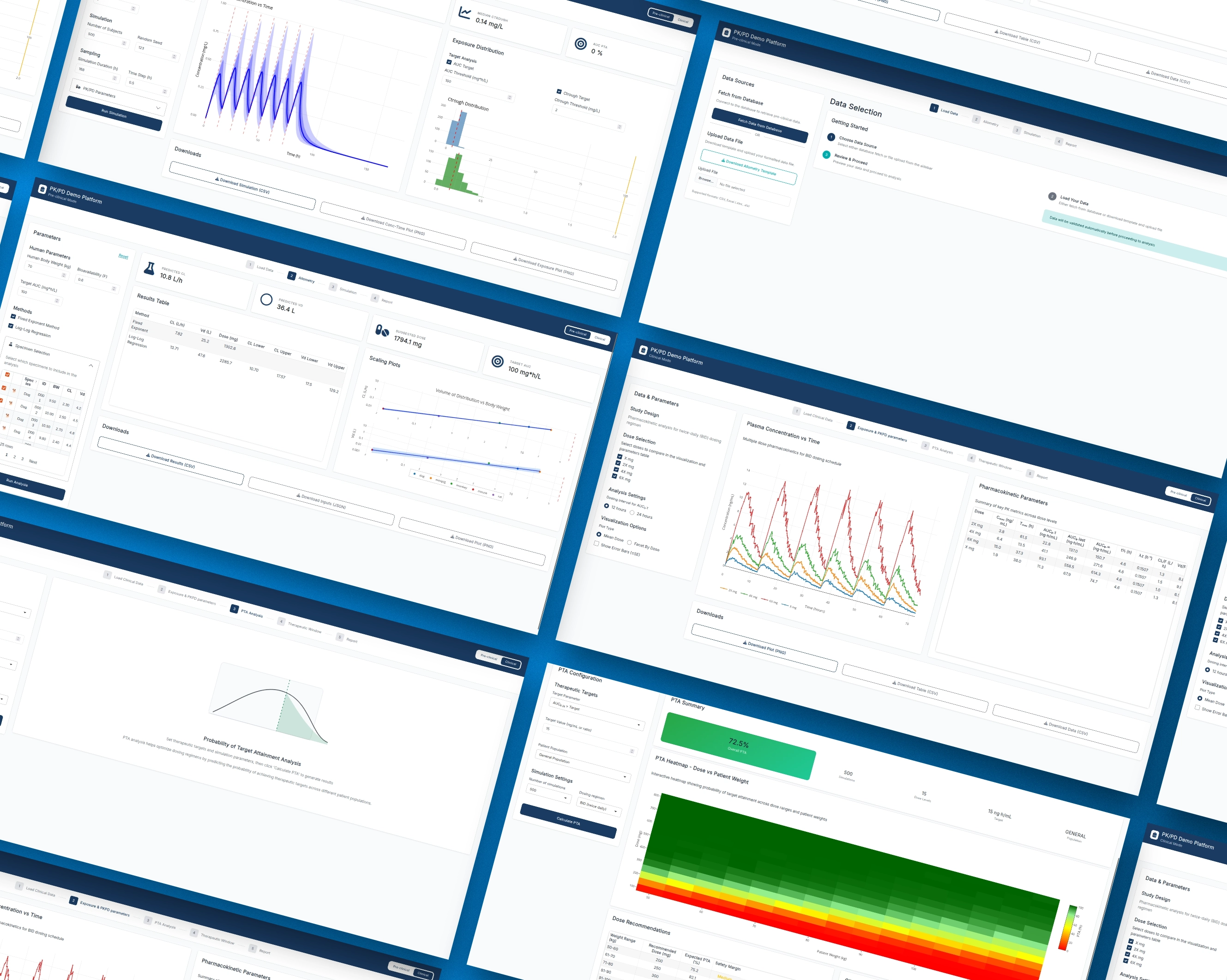
Here’s what six AI tools got us in 48 hours. Note that this isn’t a production-ready code, it’s just a functional demo.
Production Readiness in AI Dashboard Development
Let's be honest about what we built - a functional prototype, not production code.
The 48-hour sprint gave us something tangible to show clients. Multi-dose simulations worked. Concentration-time curves rendered correctly. The UI looked professional. But shipping this to a regulated pharma environment? That's a different conversation.
What AI Handles Well in Clinical Dashboards
In our case, AI tools excelled at rapid iteration work.
UI generation and styling was fast. We could describe what we wanted, feed in screenshots, and get clean interfaces back in no time. V0.dev would redesign layouts. Claude would implement them in Shiny.
Functional code for standard components worked well too. Basic Shiny modules, plotting logic, data transformations - AI handled these without issues. When we needed concentration-time curve visualizations or exposure distribution plots, the tools have no trouble generating a working code.
Self-correction through MCP tools was maybe the biggest win. Playwright let Claude run the app, screenshot it, spot issues, and fix them autonomously.
The tools also handled brainstorming and content generation better than expected. We used Claude to suggest additional analyses for the PK/PD platform, then refined that list with our team.
Where Human Expertise Remains Critical
Architecture decisions weren't something we could delegate to AI.
Data design and structure needed human oversight. So questions like:
- How should the PK/PD simulation handle different dosing regimens?
- What's the right data model for exposure distributions?
Still need human expertise.
One more complex point that required our oversight was the decision on how to represent pre-clinical and clinical split of analyses in the dashboard. Our demo has to showcase both while being aware that the client might not want to combine them in a single app. That’s why we came up with an idea to add a toggle in the navbar to switch between the two dashboards.
Compliance and regulatory requirements are non-negotiable in pharma. Our prototype didn't need to meet FDA validation standards, but production code does. That's specialized domain knowledge AI tools don't have.
Code quality and maintainability also required human review. AI-generated code works, but is it something your team can maintain six months from now?
We spent human time on direction - deciding which AI outputs to use, providing structural guidance, and making calls about what to implement next.
In other words: we did the thinking, AI did the typing.
AI tools turned a typical 4-6 week project into a 2-day sprint for prototyping. But getting from prototype to production-ready code in a regulated environment still requires experienced developers who understand both the technical requirements and the domain constraints.
What AI-Assisted Shiny Development Means for Your Pharma Team
We’re sure you’ve heard this one before, but we stand by it: AI-assisted development won't replace your developers - it multiplies what they can do.
The 48-hour sprint proved that AI tools can compress weeks of prototyping work into days. Your team can go from stakeholder request to working demo before the next review meeting. This audience just needs to see the benefit, and if they don’t, at least you’ve spent two days working on the app instead of six weeks.
Here are the takeaways:
- AI orchestration works. Multiple tools used strategically outperform any single AI assistant.
- Human expertise remains critical. Especially for architecture, data design, and compliance requirements in regulated environments.
- Be strategic about AI. Use AI for rapid iteration and exploration. Apply traditional software engineering practices for production work.
The future of clinical dashboard development is hybrid. Your developers still have to provide direction and domain expertise. AI tools just help them with repetitive coding and rapid prototyping cycles.
Looking to accelerate your clinical dashboard development? Explore Advanced Data Visualizations to see how we combine AI-enhanced workflows with production-grade quality.