Rhino 1.12.0: Code Coverage and AI Agent Support for Shiny Apps

Rhino 1.12.0 brings two major capabilities to Rhino-powered Shiny applications: built-in code coverage support via {covr}, and AGENTS.md scaffolding that gives AI coding agents the context to work effectively in your Rhino project.
Let's walk through what's new.
Code Coverage with covr_r() and covr_report()
Measuring test coverage has always been important, but Rhino's box-module architecture made it impossible to use {covr}, which didn't support box imports. The Appsilon team contributed the necessary box support upstream to {covr} (included in covr 3.6.5). With that foundation in place, Rhino 1.12.0 adds two new functions that make coverage a built-in part of Rhino apps:
rhino::covr_r()runs a coverage analysis on your Rhino app's R source files (app/) against yourtests/testthat/test suite.rhino::covr_report()generates an interactive HTML coverage report you can browse in your viewer.
Getting Started
Running coverage is as simple as:
# Run coverage analysis
coverage <- rhino::covr_r()

# View an interactive HTML report
rhino::covr_report()
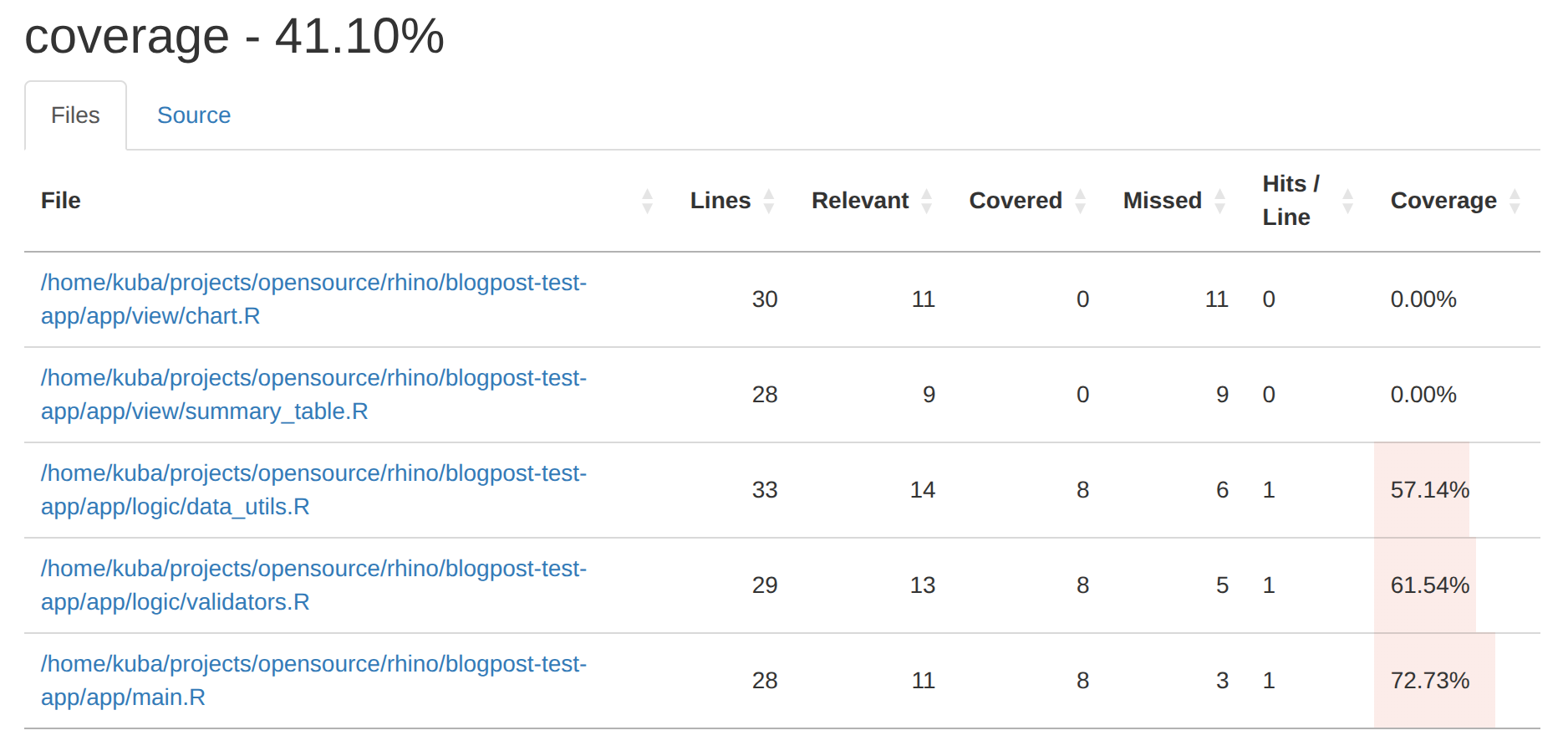
.png)
Under the hood, covr_r() generates a temporary box::use() loader that imports all your app modules, so {covr} can trace execution across box-based imports. This means you don't need to change your app structure at all.
Fine-Tuning Coverage
You can customize which source and test files are included, and exclude specific lines or functions:
# Cover only the logic layer
rhino::covr_r(
  source_files = list.files(
    "app/logic",
    pattern = "\\.R$",
    full.names = TRUE,
    recursive = TRUE
  )
)

# Exclude specific lines or functions
rhino::covr_r(
  line_exclusions = list("app/main.R" = c(1:5)),
  function_exclusions = "deprecated_function"
)
This makes it easy to integrate coverage checks into your CI pipeline or track coverage trends over time.
AGENTS.md for Rhino Applications
AI coding agents like Claude Code, GitHub Copilot, and Cursor are becoming a regular part of the development workflow. But these tools work best when they understand the conventions of the project they're working in, and Rhino has quite a few: box::use() imports, module structure, specific testing patterns, and more.
Rhino 1.12.0 introduces AGENTS.md scaffolding that gives AI agents the context to write correct Rhino code.
What's in the Generated AGENTS.md?
The scaffolded AGENTS.md covers the key Rhino conventions that agents most often get wrong:
- Import rules: use only
box::use(), neverlibrary()or::. Imports must be explicit, sorted alphabetically, and limited to what's actually used. - Module templates: the standard ui/server pattern for app/view modules with proper
NS()usage. - Unit testing patterns: how to test both exported and non-exported functions from box modules, including the
attr(module, "namespace")pattern for accessing internals. - Code style: line length limits and other conventions enforced by linting.
.png)
Adding AGENTS.md to Your Project
New projects get AGENTS.md automatically; it's included by default when you run rhino::init().
For existing projects, add it anytime with:
rhino::use_agents_md()This copies a ready-to-use AGENTS.md into your project root. You can then customize it with project-specific conventions, domain context, or team preferences.
Tip: The generated AGENTS.md covers general Rhino conventions. Consider extending it with your project's specific business logic patterns, API conventions, or naming standards to get even better results from AI agents.New use_*() Functions for Existing Projects
In previous versions, GitHub Actions CI was the only optional component you could enable during rhino::init(). If you skipped it, you had to set it up manually.
Rhino 1.12.0 extends this pattern with new optional components and introduces standalone use_*() functions that let you add any of them to an existing project at any time, with no need to re-initialize:
# Add GitHub Actions CI workflow
rhino::use_github_actions_ci()

# Add Cypress end-to-end test structure
rhino::use_e2e_tests()

# Add AGENTS.md
rhino::use_agents_md()Each function is conflict-aware: if a file or directory already exists, you'll be prompted to back it up before overwriting. This now works for directories too, not just single files.
Other Improvements
- Node.js dependency updates: all Node.js dependencies have been updated to address security vulnerabilities reported by automated scanning. The minimum supported Node.js version is now 20.
Getting Started
Install or upgrade from CRAN:
install.packages("rhino")If you're upgrading an existing project, check the Rhino 1.12 Migration Guide for details.
The Rhinoverse Ecosystem
Rhino is the centerpiece of Rhinoverse, Appsilon's collection of open-source R packages for building modern Shiny applications. Explore the full ecosystem at rhinoverse.dev.
Summing Up Rhino 1.12.0
Rhino 1.12.0 makes it easier to keep quality high and bring AI assistants into your Shiny projects. Built-in code coverage shows how well your tests exercise your app code, AGENTS.md keeps AI coding agents on Rhino's conventions, and the new use_*() functions add these to an existing project in one line.
