We Built a Clinical Trials AI Assistant in Hours - Here's What Actually Worked

What happens when 75,000 clinical study results meet an LLM?
Imagine your team needs evidence-based answers to clinical questions like "Which medications can be combined with ibuprofen to help treat back pain?" These require analyzing study data from ClinicalTrials.gov, which is a database with over 559,000 clinical trials worldwide.
The traditional approach means weeks of API integration work, query logic development, and UI refinement. Maybe longer if you're working with limited resources.
We built a working conversational AI assistant that queries this data in hours.
This article breaks down what actually worked, what failed, and what it means for pharmaceutical teams looking to prototype AI tools rapidly.
The Challenge - Answering Clinical Questions That Require Study Data Analysis
ClinicalTrials.gov holds 75,000 publicly available trial results, each one obtained through rigorous scientific trials. This is ground truth data that healthcare professionals use to determine optimal treatment plans for patients worldwide.
For an average Joe, it’s a wall of records written in professional domain language.
It takes hours to understand the description and results of a single study. Even finding the right study is a challenge in itself.
Our goal here was simple: Employ an LLM to make this data accessible through natural language.
We needed an assistant that could handle natural language questions like "Which medications can be combined with ibuprofen to help treat back pain?" and return evidence-based answers with citations.
Traditionally, this would take weeks of API integration work, query logic development, and UI refinement. Our constraint was to build it in hours to validate whether the pattern works.
How We Built a Conversational AI Assistant for Clinical Trial Data
Speed was the priority.
We decided to rely on batteries-included frameworks and libraries so we could focus on delivering value - integrating an external knowledge base (ClinicalTrials.gov) with our LLM, letting it query records, pick the most relevant ones, and do the reasoning.
Feature-wise, we didn't pick up anything that wasn't an absolute necessity at this step.
The result was a working proof of concept by the end of a 4-hour workshop.
When we were happy with the initial result, we continued iterating. We expanded the implementation with chat history, status messages, a drawer menu, and other features that improve the overall user experience.
The Technical Pipeline - From Question to Evidence-Based Answer
All the magic starts with the user hitting "Send" after typing in their question.
Here’s a high level overview of everything happening below the surface:
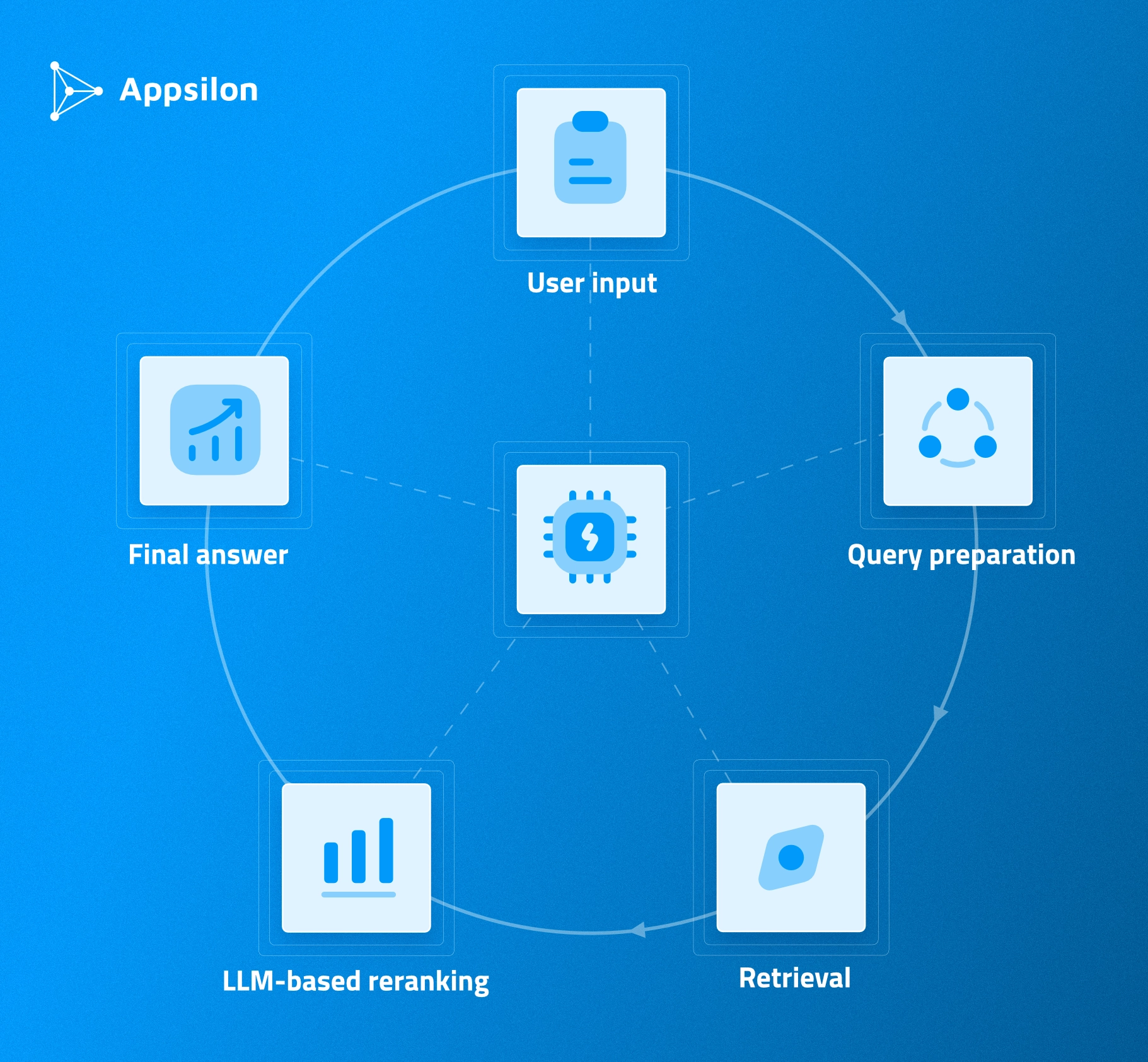
- User input: The natural language question comes in. Let’s say "What is the effect of ibuprofen for back pain treatment?"
- Query preparation: The LLM transforms the question into the format supported by ClinicalTrials.gov API. There are plenty of fields we can query, such as study description, condition, region, status. Some filters are non-negotiable. We only show studies that are completed and have publicly available outputs. LLM suggest setting the "treatment" field to "back pain" and the title to include "ibuprofen."
- Retrieval: The API returns up to 30 matched trials. If nothing is returned, we just go back to the user with a predefined "Sorry, I couldn't find any study that matches your question." But if there are results, we face another challenge: how to pick the ones that are most relevant to the question?
- LLM-based reranking: This is a common problem when integrating LLMs with RAG (retrieval-augmented generation). If we want to base our final response on previously retrieved documents, we need to limit ourselves to only the most relevant ones. We took the retrieved trials' descriptions, collated them with the initial user query, and asked an LLM to pick 0-3 most relevant studies. From the frontend perspective, users only see a spinning icon with a description of what's happening in the background. There are way more tokens generated in the process than just user input and AI's final response.
- Final answer: We ask an LLM, given a list of up to 3 most relevant studies, to provide the final answer based on the user's original question and trial results. For this purpose, we include the entire study document in the prompt directly. The answer generated in this step is streamed directly to the user with citations and evidence-based reasoning.
That's the pipeline. Question in, evidence-based answer out. Now let’s discuss tech stack.
Tech Stack Decisions - What We Used and Why
Although we’re heavily invested into R, we decided to use Python’s amazing ecosystem of tools and AI packages for this project. Here’s the entire tech stack:
- Python: Amazing community support, libraries, and tooling. It’s the de facto language for machine learning and AI.
- LangChain: One of the most popular solutions for integrating LLMs in your code. It provides classes and utilities that simplify advanced interactions, like our RAG chain.
- LangGraph: Allows you to represent the entire LLM flow using the concept of graphs. We went for this stack due to its popularity at the time, hoping for high availability of community support and up-to-date documentation.
- LangSmith: The monitoring platform. For any LLM interaction we make, either exposed to the end user or not, we wanted to have a trace of it to see what precisely went into the context and what was outputted. It also allowed us to monitor the cost per query and average time to generate the response.
- Streamlit (initial): Our initial choice as a full-stack framework that would allow us to ship it to the web without writing too much code. We were OK with a minimalistic, opinionated frontend as long as it would let us avoid writing a client app from scratch.
- Chainlit (final): This framework is specifically designed to run chatbot applications with minimum setup on the frontend. It allows for streaming responses token-by-token. It comes opinionated with predefined structure - threads on the left, conversation in the center, optional drawer on the right, and input box on the bottom. All that's left to us is connecting logic to the "Send" button.
If you’re familiar with Python, you know all of these are usual suspects. They just work - an in just a couple of hours, they took us to a working proof of concept:
That was the stack. Some parts worked better than others. We’ll explain why next.
AI Tools for Clinical Tool Development - What Worked and What Failed
We developed this project with support of code generation AI tools. Here's how they actually performed, so you can know what to use and what to avoid.
GitHub Copilot - The Unexpected Winner
The Visual Studio Code and GitHub Copilot combo is a great starting point for anyone trying advanced AI-assisted software development.
With the Copilot extension, you can focus on writing a detailed prompt while all the important context (like files' contents) is passed to an LLM in the background.
We noticed that the best approach is to follow the same development process as with manual work. Start with a clean working tree - all the previous work is committed. Set a concrete goal and list of requirements. The prompt should contain all of those and on top of that, other dev notes that you would give to a new team member.
Then, review the changes, manually test them, and commit.
Here’s where Copilot shines:
- Excellent for frontend prototyping: It generated single files that we could review and adjust to our needs. This worked well when we had a clear idea of what we wanted but didn't want to write boilerplate code.
- Great for writing tests: Copilot handled test generation with ease. We'd write the function, and it would suggest test cases we might have missed.
- Helped level up documentation: We started with a bare minimum hand-written Makefile and let Copilot build the README around it. It created a project description, list of commands, repository structure, and kept it visually appealing for someone going into the repository for the first time.
Overall, Copilot is best for the “generate file - review - adjust” approach. The key is not trusting "agent mode" to take care of everything. Work in small increments.
ChatGPT - Where It Added Value
ChatGPT worked well for quick frontend prototypes when we wanted to generate visual components.
The best results came from strategic use - asking it to generate a single file or component, then reviewing and adjusting manually. It’s similar to GitHub Copilot but through a chat interface rather than IDE integration.
When we needed a specific UI component, ChatGPT could generate it quickly enough for us to iterate. When working with it, keep the scope narrow. One file, one component, one clear task.
However, ChatGPT is not reliable for full "agent mode" development. Asking ChatGPT to handle multiple files or complex workflows resulted in code that needed significant revision. The context window limitations are apparent here.
With that in mind, we decided to use ChatGPT for isolated tasks where we needed quick generation and could review the output immediately.
LangChain/LangGraph - The Spectacular Failure
LangChain and LangGraph eventually worked, but we’ll be honest here - the process was painful.
It failed because both are experimental frameworks with frequent breaking changes. These frameworks were supposed to simplify the development of LLM applications by providing patterns, structures, and utilities. But it feels like the framework creators try too hard to turn everything into a one-liner.
On top of that, methods and classes from different submodules aren't always compatible with each other. Both are also full of breaking changes from version to version, and new versions are published frequently.
Here are the biggest challenges we faced:
- LLMs generate code based on deprecated functions: Once you find a working solution for your problem on Stack Overflow or through ChatGPT, it turns out that it only works with a specific version of LangChain that's long deprecated. Sometimes there's no obvious migration guide or workaround.
- Hallucinated methods: Since LangChain and LangGraph are still in experimental phase and tend to change the framework structure between releases, code generated by LLMs is almost always not working due to deprecated function calls or even completely hallucinated methods.
- Manual development through docs was faster and more reliable: Using AI assistants like ChatGPT or Copilot to generate LangChain code is going to backfire. It turned out to be much more reliable and faster to go through the docs and write it manually.
That's the lesson. When working with rapidly evolving frameworks, AI code generation saves you zero time because you spend it all debugging deprecated methods.
From Basic Chatbot to a Full Clinical Trial Assistant
The initial 4-hour sprint gave us a working proof of concept.
But a bare-bones chatbot that answers questions isn't enough for real user testing. We needed features that people expect from a chatbot app - chat history, the ability to continue previous conversations, proper streaming, and a simple interface.
So we continued iterating.
Why Streamlit Wasn't Built for Chatbots
Streamlit is usually great for prototyping apps in Python. It was our first choice because we wanted to avoid writing a client app from scratch.
However, implementing basic features (like streaming) was a nightmare. Streamlit it's built for data apps and dashboards, not conversational interfaces. It becomes a pain to use as soon as you want to customize it or use it outside the scope it was designed for.
- We needed true streaming mode where tokens appear on the screen as they're generated.
- We needed chat history that persisted across sessions.
- We needed a conversation interface that felt natural. Streamlit's page-refresh model worked against us.
So, we made the strategic switch to Chainlit. The decision to switch frameworks mid-project isn't ideal. But continuing with Streamlit would have cost us more time than starting fresh with a purpose-built solution.
Chainlit - Purpose-Built But Not Perfect
Chainlit is a frontend wrapper built specifically for chatbots.
It immediately solved our streaming problem. Tokens appear on screen as they're generated - exactly what we needed for a responsive user experience.
It had issues around customization and integrating with specific LLM workflows. But we got what we needed, which was a functional chatbot interface that didn't require building everything from scratch.
We implemented personal accounts, chat history, conversation follow-up, true streaming, and proper UI.
It comes with chat interface patterns built in. Personal accounts with history of chats. The ability to go back to a previous conversation and follow-up. A general chatbot look and feel that users expect.
The switch from Streamlit to Chainlit cost us time upfront but saved us days of fighting against the wrong tool.
The "One-Liner" Problem with AI Frameworks
LangChain, LangGraph, and Chainlit all share a common problem - they try too hard to be "one file" solutions.
This looks nice in the docs. You see elegant examples that solve complex problems in a few lines of code. Marketing materials show beautiful one-liners that handle complex LLM workflows. Sample code runs perfectly in isolated examples.
But when you try to build something more complex, it turns out that individual pieces of those frameworks don't always work with each other.
- You want to customize the RAG pipeline? You're now fighting against framework abstractions.
- You want to integrate a specific LLM feature? The framework's opinion about how things should work gets in your way.
- You want to combine components from different parts of the framework? Good luck - they might not be compatible.
This is the trade-off with batteries-included frameworks. They're fast when you stay within their intended use case. They're slow when you need to do anything they didn't anticipate.
We hope that the PydanticAI team - an emerging Python alternative to LangChain - will learn from these mistakes. The early signs are promising, but it's too soon to tell if they'll avoid the same pitfalls.
What This Means for Pharmaceutical AI Tool Development
Long story short, we built a working conversational AI assistant in hours, not weeks. There are some clear takeaways for pharmaceutical teams.
Speed + Validation
Traditional development requires gathering requirements, writing specs, allocating resources, and committing to multi-week sprints before you know if the approach will work. By the time you discover the pattern isn't right for your use case, you've already spent the budget.
On the other hand, hours-long prototyping means you can test use cases before budget commitments.
- You can validate whether conversational AI makes sense for your clinical data queries before pulling developers from critical projects.
- You can test multiple approaches in parallel and see which one resonates with users.
- You can show stakeholders a working demo in the first meeting instead of slides promising future capabilities.
This doesn't mean every prototype becomes production code. But it means you're making informed decisions based on actual working software rather than theoretical requirements documents.
For pharmaceutical teams with limited development resources, validation speed is a clear benefit. You can't afford to spend six weeks building something nobody will use.
Technical Honesty in Regulated Environments
Transparency about what works (and what doesn't) matters in pharma.
We told you LangChain failed. We told you Streamlit wasn't built for chatbots. We told you AI code generation for rapidly evolving frameworks wastes time rather than saving it.
We need more honesty in the age of AI, and it unfortunately isn’t common in vendor conversations.
Most of them will show you polished demos and promise seamless integration. They won't tell you about the framework limitations they hit. They won't admit when their "one-liner" solution required hours or days implementing workarounds.
In regulated pharmaceutical environments, this transparency matters.
You need partners who understand the gap between prototype and production. You need teams who won't oversell AI capabilities and then deliver code that can't meet GxP requirements. You need honest assessments of tool performance rather than marketing claims.
The Gap Between Prototype and Production
Let's be clear about what we built - a functional prototype that demonstrates the pattern works. This isn't production-ready code that meets FDA validation standards.
The prototype proved that conversational AI pattern works for clinical trial data queries. Users can ask natural language questions and get evidence-based answers with citations. The response time is acceptable. The accuracy is promising.
Production, on the other hand, require:
- Comprehensive testing and validation that the LLM responses meet clinical accuracy standards.
- Audit trails for every query and response.
- Version control and change management that meets GxP requirements.
- Performance optimization for concurrent users.
- Security reviews and data privacy compliance.
Getting from prototype means applying pharmaceutical software development standards that ensure the tool is reliable, validated, and compliant.
For pharmaceutical teams, the value of rapid prototyping is validating the pattern before investing in production development. You don't want to spend three months building a GxP-compliant tool only to discover users don't find conversational AI useful for their workflow.
Prototype first. Validate with users. Then commit to production development.
Pattern Recognition Across Clinical Tools
The clinical trials assistant is one example of AI-assisted rapid prototyping.
The same principles apply across other clinical tool development:
- Dashboards: Fast prototyping of PK/PD simulations, concentration-time visualizations, and exposure distributions. Validate the interface and functionality before committing to full development.
- Data integration: Quick validation of API connections, data transformation logic, and output formats. Test whether the integration pattern works before building production pipelines.
- Analytical applications: Prototype statistical analyses, visualization approaches, and user workflows. Get feedback from statisticians and clinical teams before investing in production code.
The common point is speed of validation.
AI-assisted development compresses weeks of traditional development into days or hours for prototyping. This doesn't replace careful production development, but only informs which production efforts are worth the investment.
What AI-Assisted Clinical Tool Development Means for Your Pharma Team
To conclude, it’s safe to say AI changes prototyping speed.
We built a working conversational AI assistant that queries clinical trial data in hours. The pattern works. Users can ask natural language questions and get evidence-based answers with citations.
But to make an informed decision for a long-term project, you need to understand what works.
You can validate use cases before budget commitments, get working demos in stakeholder meetings instead of slides promising future capabilities, and make informed decisions about AI tool adoption based on honest assessments of what works.
The future of clinical tool development is hybrid. Your teams provide direction and domain expertise. AI tools accelerate the prototyping and iteration cycles. Experienced partners deliver both speed and expertise.
This is our second public AI case study building a pattern of innovation. The first was a PK/PD simulation dashboard built in 48 hours.
If you want Appsilon to help you implement generative AI in your organization, or build a full custom solution from scratch, book a consulting call with our experts.