GxP Isn't Limiting Your Coding Agent. Your Setup Is

Read this if you build software around clinical trials and feel like GxP compliance caps your Copilot, Claude Code, or Codex at 10% of what it can do.
More than halfway through 2026, it seems that every company with an ambition to stay on the cutting edge of technology is investing in AI tooling for its employees. Whether it’s a coding agent, a chatbot with a knowledge base, or an assistant of any other sort, there are plenty of ways to leverage AI to work more efficiently day to day. All of that holds true in the pharma industry, and clinical trial tooling is no exception.
In my last piece, I shared a lot of tips for efficient coding agent usage, and I think they are still very much relevant. However, in the pharma context, and more specifically under GxP compliance, the tokens you burn are probably not your biggest problem.
If you develop tools around clinical trials, interact with clinical study data, or ship apps into a validated environment, you’ve probably had this experience: you can’t actually point the coding agent at the thing you’re working on. Not because of the token budget, but because the agent can’t run where the real data is.
Moreover, the agent can’t debug the environment, read through the logs with you, or fix an error that only shows up when your code meets production data. You might think about copying and pasting some of the things on your screen, but then you remember that your company’s AI policy doesn’t allow it (rightly so).
Then you likely end up falling back to coding by hand, in an AI-free IDE, inside the validated environment. It’s slow, but eventually you manage to find the specific data point that makes your app behave in an unexpected way. Or worse, you ask your agent to fix the error while giving it only vague context, hoping it figures everything out on its own without access to the data, the logs, or the environment in general. (Three days, 20 iterations, and 1,500 new lines of code later, it works, and five other features are broken.)
So how do you get out of that hole? And better yet, how do you avoid falling into it in the first place? Thankfully, at Appsilon we’ve seen this often enough to know what a setup needs in order to be coding-agent friendly.
Make the agent ask instead of assume
We all know that agents can hallucinate and give wrong answers. However, when it comes to coding agents, hallucinated code isn’t the biggest problem. More often than not, mistakes like calling a non-existent function or passing the wrong parameters get caught at the build step, and a well-prepared agent can run that step itself, inspect the errors, and fix them. The far more dangerous output is code that is “technically correct”: it builds, it runs, and it rests on a dozen assumptions you never made.
Consider what happens when you give the agent vague context, such as “fix the error when the user clicks Run button” or “make sure we have proper input parsing”. It can easily generate hundreds of lines, so it will cover every branch in the logic, including the ones you know are impossible in production. Asked to handle errors, it may well produce a triple-nested exception handler with retry logic that nothing in your application needs. In other words, the agent will do everything it can to hand you the result you asked for, and it will invent whatever it needs to invent to get there.
In a validated environment, it’s a liability, because every one of those invented branches is code you now own, review, and justify. The fix is to make the agent stop and ask instead of filling the gap itself. Try adding this to your prompt:
Make no extra assumptions about the business logic or the target environment. Don’t change requirements, don’t change existing interfaces, don’t install new packages, don’t add custom error handling. If any of that seems necessary, ask me first.
As discussed in my previous piece, once a rule like this proves useful, it belongs in AGENTS.md rather than in every prompt you write.
Make your app runnable outside the validated environment
When an application runs in a validated environment, interacts with GxP processes and tools, and, most importantly, accesses study data, it’s easy to fall into the trap of writing code that only runs in the target environment. Saying “this app will only ever run on the XYZ platform, so let’s assume that in every code path” is simply the path of least resistance. It’s also an easy way to accumulate a significant amount of technical debt without noticing.
The consequence is that seeing any change live requires a round trip. At best, you commit, push, and run a script in the target environment’s terminal. At worst, your application needs a multi-step build that takes several minutes per iteration. When coding by hand, that’s a coffee break. In agentic coding, it means your agent needs constant attention, because it can’t run anything on its own.
Here’s the catch: the major coding agents’ harnesses are built around the ability to run code, inspect the result, and iterate on errors. Take that away, and the agent starts guessing. It writes overly defensive code and makes design decisions no human would arrive at. The mitigation is simple to describe and slower to implement: as many components as possible should be runnable and testable locally, so that the agent can actually reach them. For GxP and GxP-adjacent apps, that means investing time in mocks of the GxP services, APIs, and platforms you depend on.
Let’s illustrate this with an example. Say you build a dashboard that displays statistics for an ongoing study, such as enrollment over time and participant demographics. You don’t own the data; it’s exposed through an API that can only be reached from inside the validated environment.
Bad design: the API can’t be reached locally, so running the application outside the validated environment fails as soon as it tries to fetch the data.
Good design: the application detects a local run (e.g. through an environment variable) and calls a mock instead. The mock returns synthetic data in the same shape as the real response.
With the good design, you can develop freely without moving code into the GxP environment every time you want to see a small change live. This matters especially when you’re building an advanced UI layer: there’s no reason to wait one to five minutes to check how a box looks five pixels further to the left, and no reason to test that against real services either.
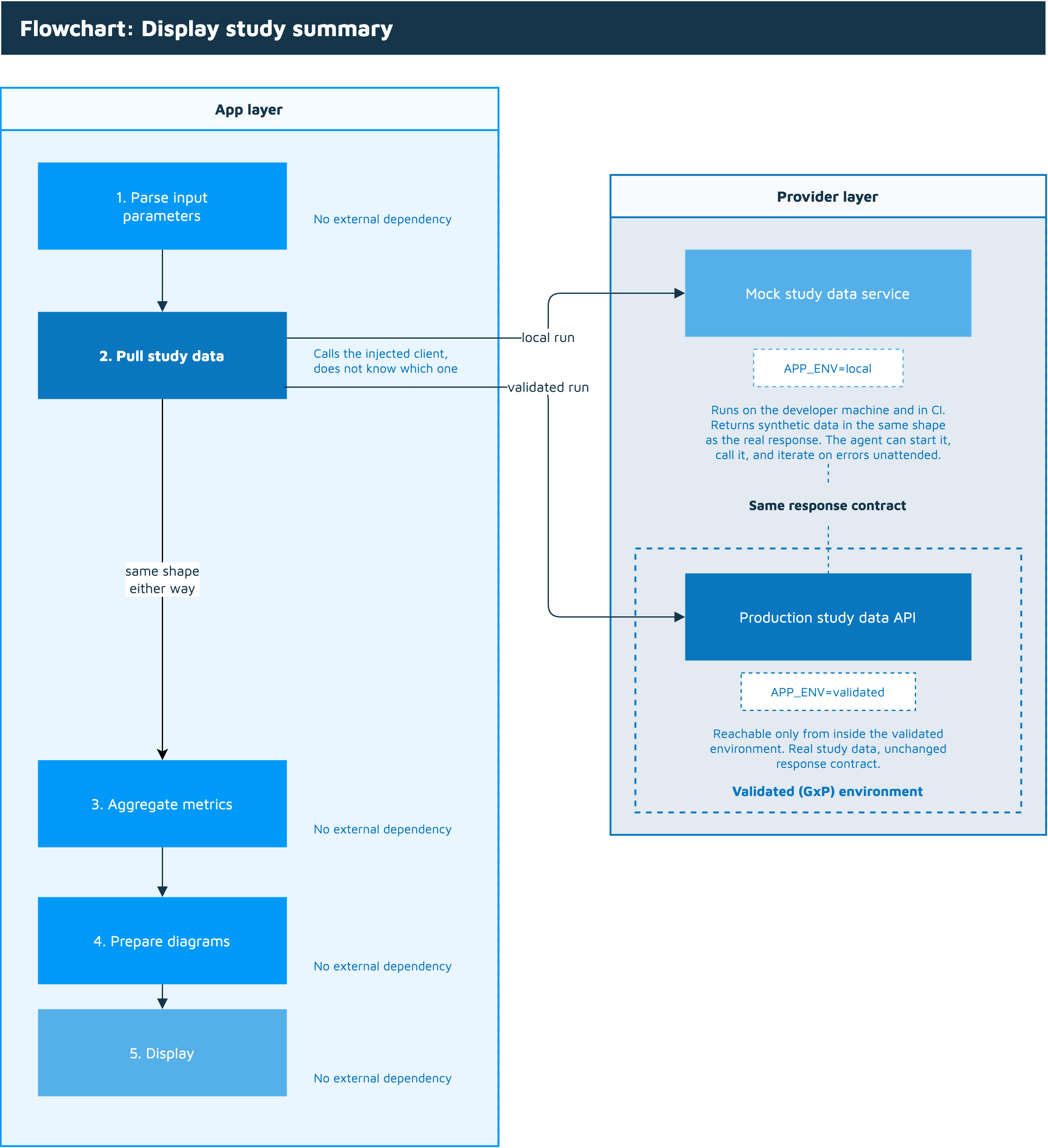
Most of the logic runs unchanged locally. Only the GxP service needs a mock.
It’s also worth noting that everything in this section is long-standing good practice among seasoned software engineers, in every industry and not just pharma. “The Twelve-Factor App” dedicates its fourth factor to treating backing services as attached resources: a database or an API should be swappable through configuration alone, with no change to the code. Another example is the dependency inversion principle: pass the API client in rather than constructing it where it’s used, and the same code path can receive the real client in the validated environment and a mock everywhere else. What changes with coding agents is not the principle, but how quickly it pays off: a codebase you can’t run locally used to cost you a slow feedback loop, and now it costs you most of your agent’s usefulness.
Invest in synthetic data
In the previous section, I discussed service mocks as a way to run your application outside the validated environment. There is one dependency that deserves separate treatment, because it sits at the centre of most GxP apps: the study data itself, SDTM, ADaM, ARD, TFL. A large share of GxP and GxP-adjacent applications interact with that data directly, exploring it, transforming it, and displaying it.
With dozens of domains and hundreds of variables, it’s easy to fall into the trap of assuming this is the one dependency that can’t be mocked. A generated dataset will never capture every nuance of real data, and it gets even harder when you consider how much that data differs from study to study.
However, it’s worth remembering that what wasn’t feasible yesterday is now within reach. CDISC’s 2026 AI Innovation Challenge names AI-enabled synthetic data generation as one of three use cases put to participants, which tells you there is both a real need for it and a growing set of tools to meet that need. Generating a realistic ADaM subset used to be a project of its own. Now it’s a task you can hand to the agent, along with the specification it should conform to.
Once your application talks to both synthetic data and mocked services, the agent can finally do what it’s built to do: write code, run it, inspect the result, and iterate. But real data and real services need to be tested too, and that is what the next section is about.
Tests and documentation matter more than ever...
...and the coding agent is there to handle the boring parts.
In “A Philosophy of Software Design”, John Ousterhout describes cognitive load, how much a developer needs to know in order to complete a task, as one of the symptoms of a complex codebase. Another is what he calls unknown unknowns: cases where it isn’t even obvious which code has to change. Both are familiar to anyone who has joined a large project halfway through. Both are much worse for an agent than for a human, because an agent can’t ask the colleague sitting next to you which of the three enrollment tables is the one still in use.
Faced with an unknown unknown, the agent does exactly what we discussed earlier: it assumes. Tests and documentation are what shrink that gap. A test suite tells the agent what the code is supposed to do, and lets it verify its own work instead of handing you something that merely looks plausible. Documentation tells it which parts of the repository are relevant, which conventions apply, and which paths are dead. Neither is new advice. What’s new is that the cost of skipping it is now paid by every agent run, not just by the next developer who opens the file.
We are also, as an industry, quite bad at keeping either one up-to-date. Tests are written once and left behind after the third refactor; documentation describes an architecture that stopped existing two releases ago. Notably, this is one of the few problems where AI genuinely helps with the tedious part: an agent that already has your test suite and your docs in context is well placed to extend both, and updating a docstring is a much better use of generated tokens than a triple-nested exception handler. As I argued in my previous piece, though, the agent can draft tests but shouldn’t own them: reviewing whether they cover the actual requirements remains your job.
The way to keep this from drifting is to stop relying on discipline and make it mechanical. Add a test coverage check to CI so a drop fails the build. Require that a pull request touching the public interface also touches its documentation. Keep the agent-facing instructions, such as conventions, available scripts, what’s mocked and what isn’t, in AGENTS.md, and treat it as code that goes stale rather than a file someone wrote once during onboarding.
In a GxP context, this pays off twice. Tests and documentation aren’t only engineering hygiene here; they’re also the evidence that a reviewer, or an auditor, will eventually ask to see. A repository that is well documented and well tested is easier for your agent to work in and easier to defend, and neither of those benefits requires a single exception to your AI policy.
