What's Your Workflow?: The Landing Zone for CRO Data Deliveries

Clinical data teams don’t take a CRO delivery on trust. They check it carefully, and the problem is how much manual work that checking takes. A CRO drops a delivery onto an SFTP server, somebody downloads it, somebody runs a validator against it, and somewhere in that sequence a person has to decide whether the contents are safe to send downstream. That decision is the part that needs a human, and the handling around it is what eats the week.
This is the first post in a series we’re calling What’s Your Workflow? We take workflows we have built in Mediforce and walk through what they do. How the work gets divided between agents, scripts, and people, and why that division matters under GxP. If the word “agent” is still doing a lot of undefined work in your head, start here and come back. We’re starting with the workflow nearly every clinical data team recognises immediately, which is the landing zone.
What the review costs today
Ask a data manager what a single CRO delivery costs them and the answer usually comes back in hours rather than minutes.
Clinical data arrives in every format imaginable. Each CRO follows its own conventions around file structures, controlled terminology variants, and delivery schedules that drift over the course of a study. Site IDs get formatted one way here and another way there, and date formats disagree. Controlled term casing is inconsistent in a way that is technically wrong and mostly harmless, right up until the moment it isn’t. So the manual version of this job means checking the server or waiting for an email, downloading the files, and running CDISC validation. Then several hundred findings come back, and somebody has to sift through them to work out which ones matter and which are noise. If the answer turns out to be reject, they write an email to the CRO describing what went wrong, wait for a redelivery, and run the whole cycle again from the top.
Two things make this considerably worse than it sounds. The first is database lock. As the deadline closes in, the pressure to decide quickly goes up, and unresolved findings start piling up without a clear owner. The second is the audit trail, because documentation for regulators gets reconstructed from email threads and spreadsheets weeks after the decisions were actually made. Reconstruction is where gaps come from, and gaps have a habit of turning up during an inspection rather than during the review itself.
Fixed validation rule sets never catch everything, and manual review can’t sustain the coverage or the speed the job needs. Most of that cost sits in the handling around the validation rather than in the validation step itself.
The workflow, end to end
The workflow takes ingest off the data manager’s plate entirely and surfaces only the decisions that need a person. It runs on a schedule, checking the CRO’s server every fifteen minutes, and it can be triggered by hand when you know something has landed.
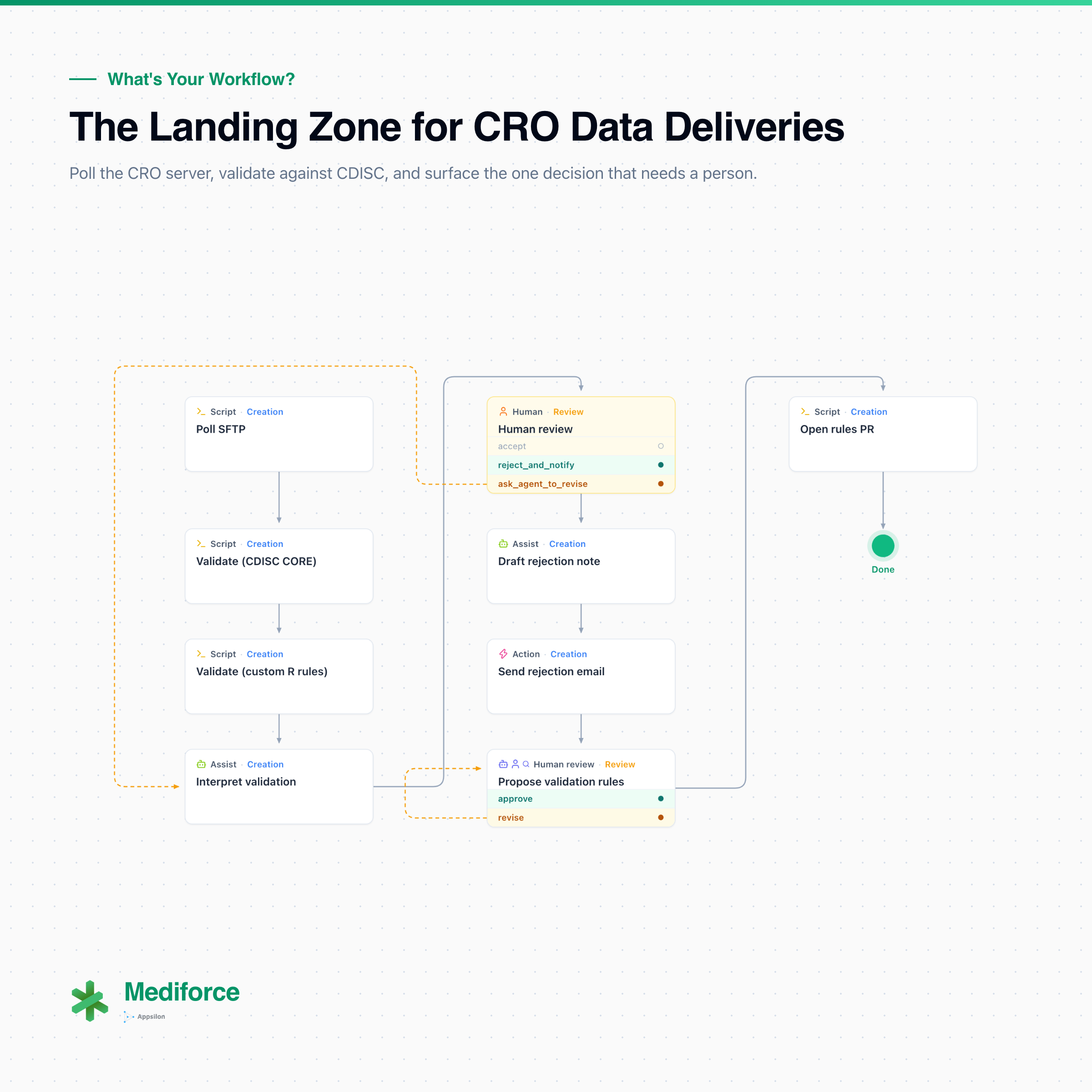
Polling the server (script). The first step checks the CRO’s SFTP for files that haven’t been seen before. If there’s nothing new, the run finishes there and nobody hears about it. If there is, the run continues into validation.
CDISC rules (script). The delivery goes through the CDISC rules engine, which catches structural conformance against the standard.
Custom rules (script). A second deterministic step runs the study-specific checks your team already owns, written in R with pointblank or in whatever language the rule happens to live in. This is a step in the pipeline rather than an optional extra, and it runs on every delivery.
Classification (agent). The first AI agent in the workflow reads the output of both validation steps and classifies the delivery: clean, recoverable once some values are fixed up, in need of improvement from the CRO, or bad enough to escalate. Alongside the classification it produces the validation report the reviewer will actually read, with the findings laid out by severity.
The decision (human). The data manager opens the task, reads the report and the agent’s recommendation, and either accepts the delivery or asks for a revision with a note on what needs fixing. The decision is logged with their identity and a timestamp. For a clean delivery, that’s the full extent of the human involvement the workflow asks for.
Rejection note and send (agent, then script). On a revision request, an agent drafts the issue report and the covering email to the CRO, scoped to the findings that came up, and the workflow then sends it. Nobody copies a finding list out of validator output into an email client.
Proposed rules (agent, then human, then script). The last part of the run is the one we find most interesting. A second agent looks at what the validation actually caught and proposes new rules to fold into the deterministic scripts. It doesn’t apply them. It puts them in front of the data manager for approval, and only once a person has approved does the workflow open a pull request against the repository holding the rule set.
Where the human sits
Mediforce sets a control mode on every step, and there are five of them. No agent is a human action, a script, or anything else automated, with no AI in it. Assist has the person do the work and an agent review it afterwards. Cowork puts the two of them on the step together, over chat or voice. Human review has the agent complete the step and hold there until a person approves. Autonomous agent has the agent complete the step and the workflow carry straight on, with the audit trail available afterwards. Setting these per step rather than per workflow is the part that matters, because one run can mix them, and this one uses three.
The SFTP poll and both validation steps run with no agent. They’re deterministic tasks and they should stay deterministic. The classification step is human review: the agent reads the output of both validators, produces the classification and the report behind it, and the run stops there until the data manager accepts the delivery or asks for a revision. That decision is where an error costs the most and reverses the least, so it gets the strictest mode on offer.
The rejection note is the step to look at closely, because it runs as an autonomous agent. The agent drafts it and the workflow sends it with no second approval in between, which for an outgoing email to a CRO would normally be more than you’d want to hand over. What makes it defensible is that the human review sits immediately upstream. Nothing is drafted at all until a person has decided to reject and written the note explaining why, so the agent is filling in a decision that has already been made and logged rather than making one.
The proposed rules go the other way. The agent drafts, the data manager approves inside the workflow, and only then does the pull request open, which puts two gates in front of any change to the rule set.
None of this is worked out at runtime. It was designed in, step by step, when the workflow was built.
More on the custom rules step
The reason that third step exists is that CDISC rules catch structural conformance and stop there. They won’t catch therapeutic-area thresholds, sponsor-defined derivation checks, or the site-level anomaly patterns your team learned the hard way on the last study. That logic usually already exists somewhere, in scripts somebody on the team wrote and still maintains.
Mediforce runs those as native pipeline steps, so R with pointblank, Python, or any containerised validator will work. The rules live as versioned YAML files owned by the data management team, rather than inside a vendor tool’s configuration screen where they can’t easily be found or diffed.
# rules/ae-checks.yml: study-specific AE checks, owned by the DM team
checks:
  - id: ae_severity_range
    description: AESEV must be Mild, Moderate, or Severe
    domain: AE
    script: ae_checks.R
    severity: critical
  - id: lb_outlier_screen
    description: Flag lab values > 4 SD from site mean
    domain: LB
    script: lb_outliers.py
    severity: major
The same accept and reject flow applies to them, and the same git audit trail captures every run. Adding your own checks doesn’t mean stepping outside the process you already have.
More on the proposed rules step
That last step is the one that changes what the workflow is over time. Having seen what the validation caught on this delivery, the agent proposes rules to add to the deterministic scripts, which is how a recurring problem like a site ID format variant or a controlled term mismatch stops being something a person notices for the fourth time.
What it can’t do is put those rules into the pipeline itself. The proposal goes to the data manager inside the workflow, and only after they approve does the pull request open against the repository holding the rule set, where it gets reviewed again before anyone merges it. Every change to how deliveries are validated arrives as a reviewed diff with somebody’s name attached to it, so there are no shadow config files and the “who changed this and why” question stays answerable during an inspection. Systems that learn from use often get harder to explain as they improve, and two gates on the rule set is what keeps this one legible.
What the audit trail is for
The real payoff compounds over a study. Validation rules accumulate, so a hard-won check becomes permanent instead of living in one person’s head, and those rules transfer between studies, so knowledge builds up in the organisation rather than walking out the door. And the audit trail becomes accurate by construction, captured as the work happens rather than reconstructed afterward.
A lot of teams reconstruct the record after the fact, pulling emails, digging through spreadsheets, and asking somebody to remember what they were thinking back in March. When the workflow captures who acted, what data moved through each step, and what the approval record was, at the moment it happened, the record becomes a by-product of doing the work.
Deadline pressure is the other half of this. Database lock makes people fast rather than careless, and speed without structure is where things get missed. A workflow that always presents the same report, the same severity ordering, and the same two buttons changes that. A decision made under deadline pressure ends up looking much more like one made in a quiet week.
What this means for your workflows
If your intake process today involves a person checking a server, a validator producing more findings than anyone can reasonably triage, and an email thread standing in for an audit record, then this is a workflow shape worth borrowing. The division of labour is the part to copy. Scripts do the deterministic work, agents do the compilation and drafting, and the decision stays with the data manager.
Mediforce is open source under Apache 2.0, and the landing zone is one of the reference workflows, so you can clone the repository and read every step definition yourself.
git clone https://github.com/Appsilon/mediforce
Next in this series: the submission coordinator’s document chase, and what happens when the follow-up emails start writing themselves.
Related reading
The rest of What’s Your Workflow?:
- The Landing Zone for CRO Data Deliveries (you are here)
- The Submission Document Chase That Runs Itself
- Synthetic SDTM From an NCT ID
- Traceable TFLs From Protocol to Table
Before this series I wrote a run of posts working through the AI concepts these workflows rely on. If any of the terminology here was new, start at the top:
- What Is an AI Agent? Skills, MCP, and Harnesses Explained
- The Four Ways to Use AI: Chatbots, Apps, Agents, and Workspaces
- How to Get Useful Answers from AI: Prompting and Context
- What Is RAG? How AI Answers From Your Own Documents
- The Four Levels of AI Autonomy: Observer, Advisor, Drafter, Executor
- Human-in-the-Loop AI: Oversight a Regulator Accepts
And on the platform itself:
- Introducing Mediforce v1.0.0: Human-in-the-Lead Workflows for Pharma
- Mediforce x Databricks: Human-in-the-Lead AI Workflows While Your Data Stays in Databricks
Book a live walkthrough. We’ll run the whole workflow against the CDISC Pilot 3 dataset, which is a real study with real validation findings and a real accept/reject flow, and show you how the config maps onto your CRO setup. Thirty minutes, with the people who built it.
